


Precision Digital ISO 9001:2000 Certified Quality System Go to Precision Digital Homepage Shop Online
What's New at Precision Digital News from Precision Digital Rate/Totalizers, Fluidwell, NOVA Rate/Totalizers, Fluidwell, NOVA Precision Digital Pricelists Precision Digital Services Precision Digital Support Services Instrumentation Design & Sales JobsContact Precision Digital CorporationView Precision Digital Videos
PD685 LOOP-POWERED NEMA 4X DISPLAY


Setup Calibration Decimal Point Selection Loop Connections

Dimensions Specifications Ordering Information Documentation


LOOP-POWERED NEMA 4X DISPLAY


Loop-Powered Indicator PD685


Features
  • 4-20 mA Input
  • NEMA 4X
  • 1 V Drop
  • 3½ Digit LCD 1" (25.4 mm) High
  • Operating Temperature Range: -40 to 85°C
  • ½ Conduit Hole Provided

The PD685 is a low-cost, NEMA 4X, loop-powered indicator that is easy to install and program and can be seen from considerable distance. It will operate over a wide temperature range meaning it can be installed both indoors and out. And the PD685's 1 V drop results in a minimal burden on the loop. Calibration is a quick two-step process involving the adjustment of only two non-interacting potentiometers.

Note: For complete installation information see instruction manuals below

Setup

The only tools needed for calibration are a calibrated current source and a screwdriver.

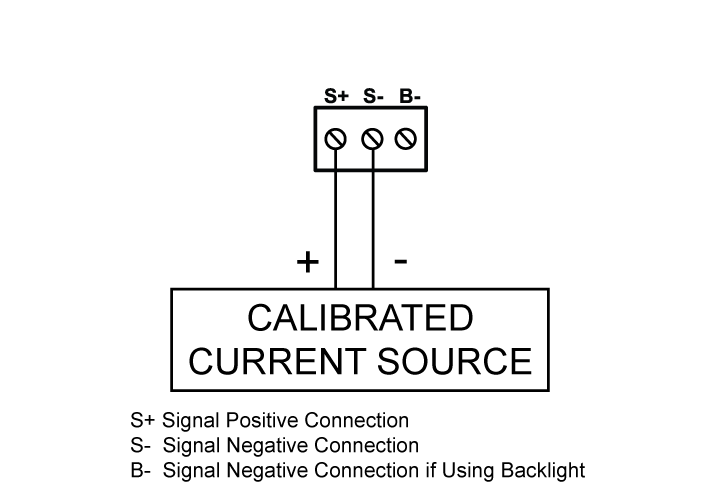
Calibration Connections

To access the input terminals it is necessary to remove the enclosure cover and the Display PCB. This is done by loosening the four screws on the enclosure cover and removing the cover. Completely loosen the left screw that holds the Display PCB to the enclosure and loosen the right screw about four turns so the Display PCB remains attached to the enclosure. Rotate the Display PCB 90° to gain access to the Input Signal PCB. Next, connect a calibrated current source per Figure 1 to the right.

Decimal Point Selection

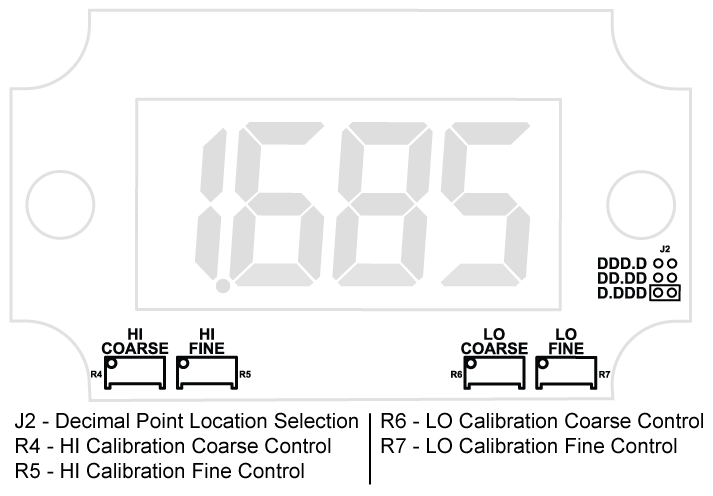
The decimal point jumper array is located in the lower right corner of the Display PCB next to the display. It is labeled DP1, DP2, DP3. Place a jumper over both pins of DP1 for a display of 199.9, DP2 for 19.99, or DP3 for 1.999.

Calibration

LO and HI calibration controls are located to the leftof the display (see Figure 1). Apply a signal equal to4 mA and adjust the LO control to display the desired reading. Apply a signal between 16 and 20 mA and adjust the HI control to display the desired reading. Complete the calibration procedure by making any minor adjustments to the LO and HI controls.


Loop-powered indicator Calibration Connections

Figure 1: Calibrator Connected to Input Signal PCB
Installation

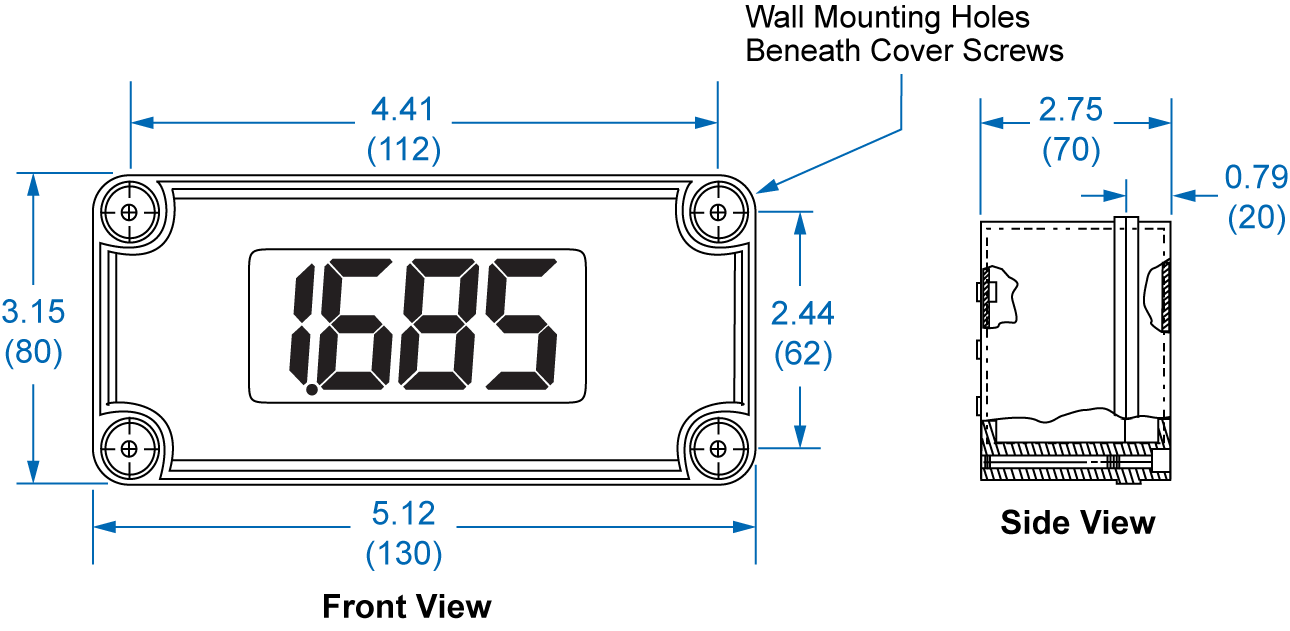
Installation of the meter involves removing the Display PCB from its enclosure and connecting a ½" conduit fitting to the hole provided. Wall mounting holes are located in each corner of the enclosure (Figure 1 shown above).


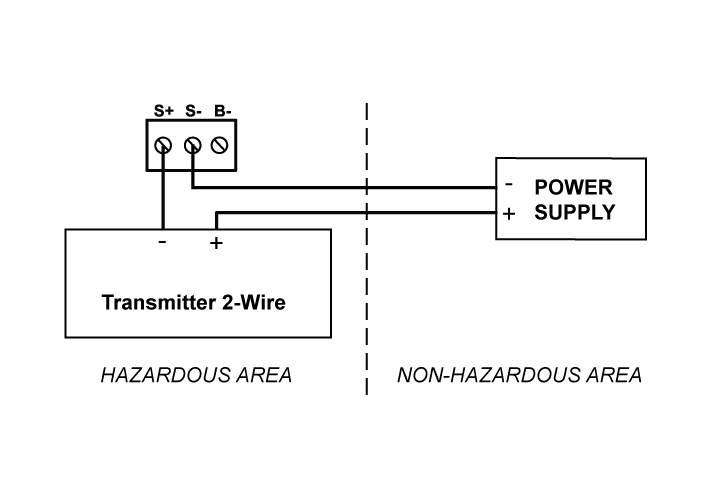
Loop Connections


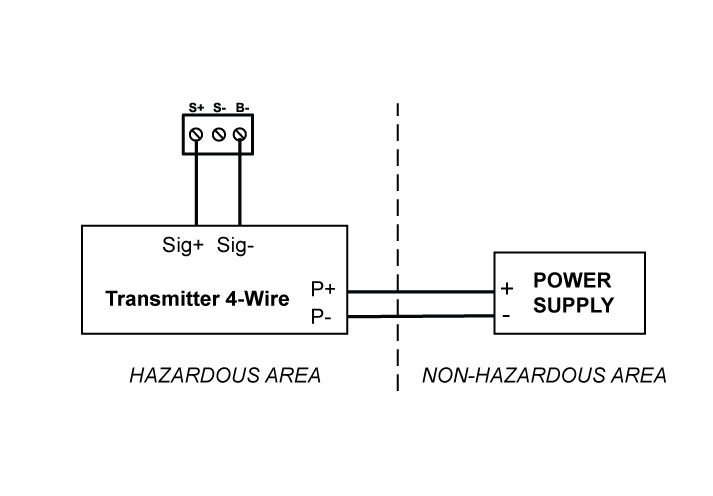
Loop-Powered Indicator PD686 FM Approved & CSA Certified Meter Intrinsic Safety Barrier Connections Diagrams

Figure 2: Control loop Connected to Input Signal PCB


Disconnect power to the loop and install the meter as illustrated in Figure 2 (shown to the left). Replace the enclosure cover.

Field wiring is made to the Input Signal PCB which is mounted to the base of the enclosure


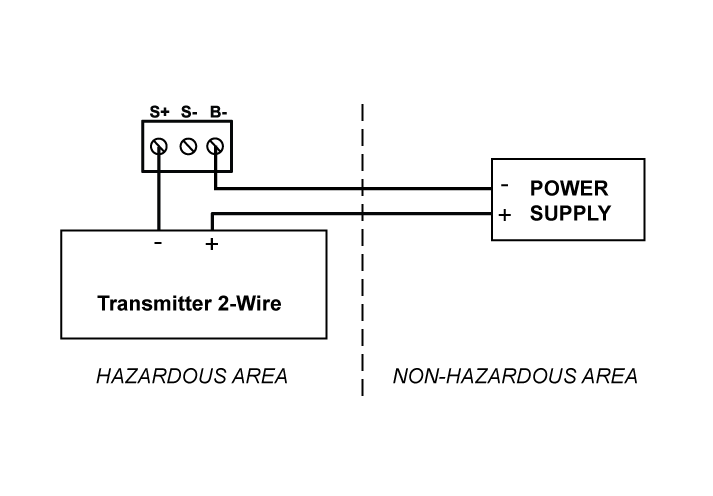
Servicing Display PCB Outside the Loop

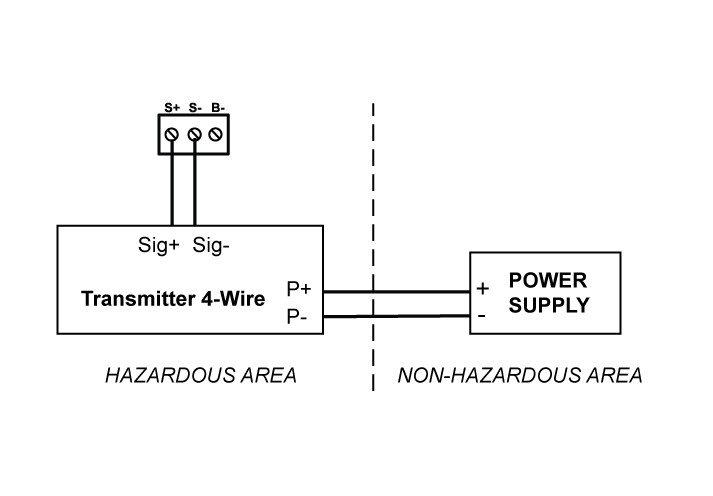
Two modes of input signal allow the user to remove the Display PCB for service without interrupting the loop as indicated above and operate the Display PCB at another location. The loop remains connected to the Input Signal PCB while the Display PCB is absent for service.

The user may operate the Display PCB at another location by connecting a signal to "S+" and "S-" wires on the Display PCB. Refer to Figure 3 to the right.

The Display PCB may be removed from the enclosure for bench calibration. Loop Jumper must be installed on Input Signal PCB to maintain loop.


Loop Powered Indicator PD686 FM Approved & CSA Certified Meter Display PCB Outside the Loop

Figure 3: Calibrator Connected to Display PCB


Dimensions and Wall Mounting Information

Loop-powered Indicator Dimensions and Mounting Spec for PD685

A: 3.15" (80 mm)C: 2.36" (60 mm) E: 2.56" (65 mm)
B: 5.51" (140 mm)D: 4.72" (120 mm)F: 0.79" (20 mm)

Figure 4

Specifications


General

Except where noted all specifications apply to operation at +25°C.

Input: 4-20 mA @ 30 VDC maximum
Display: 1.0" (25.4 mm) LCD, 3½ digits; 1999
Accuracy: ±0.1% FS ±1 count
Decimal Point: User selectable
Calibration: Two-step; non-interacting zero and span
Calibration Range: 4 mA input: -1000 to +1000
20 mA input: between 20 and 2000 counts > 4 mA display
Display Update Rate: 2.5/second
Maximum Input Current: 30 mA
Maximum Voltage Drop: 1 V @ 20 mA
Operating Temperature: -40 to 85°C
Storage Temperature: -40 to 85°C
Relative Humidity: 0 to 90% non-condensing
Enclosure: Impact-resistant plastic; body: gray ABS; cover: clear polycarbonate; NEMA 4X, IP66/67
Connections: Removable screw terminals accept 12 to 26 AWG
Conduit Hole: One ½" conduit hole provided; refer to Ordering Information to specify conduit hole location; request models with rear conduit hole (-X) for panel mounting applications.
Weight: 12 oz (340 g)
Warranty: 2 years parts & labor
Extended Warranty: 1 or 2 years


Disclaimer
The Information contained in this document is subject to change without notice. Precision Digital Corporation makes no representations or warranties with respect to the contents hereof, and specifically disclaims any implied warranties of merchantability or fitness for a particular purpose.

ORDERING INFORMATION

Products
Model Description Price
PD685        NEMA 4X Loop-Powered Meter ½" Hole Bottom        $259.00
PD685-X        NEMA 4X Loop-Powered Meter ½" Hole Rear        $259.00
PD685-Y        NEMA 4X Loop-Powered Meter ½" Hole Top        $259.00
PD685-Z        NEMA 4X Loop-Powered Meter No Holes        $259.00
  
Accessories
Model Description Price
PDA6844        Panel Mounting Kit for PD675, PD685, PD686 and PD697        $49.00
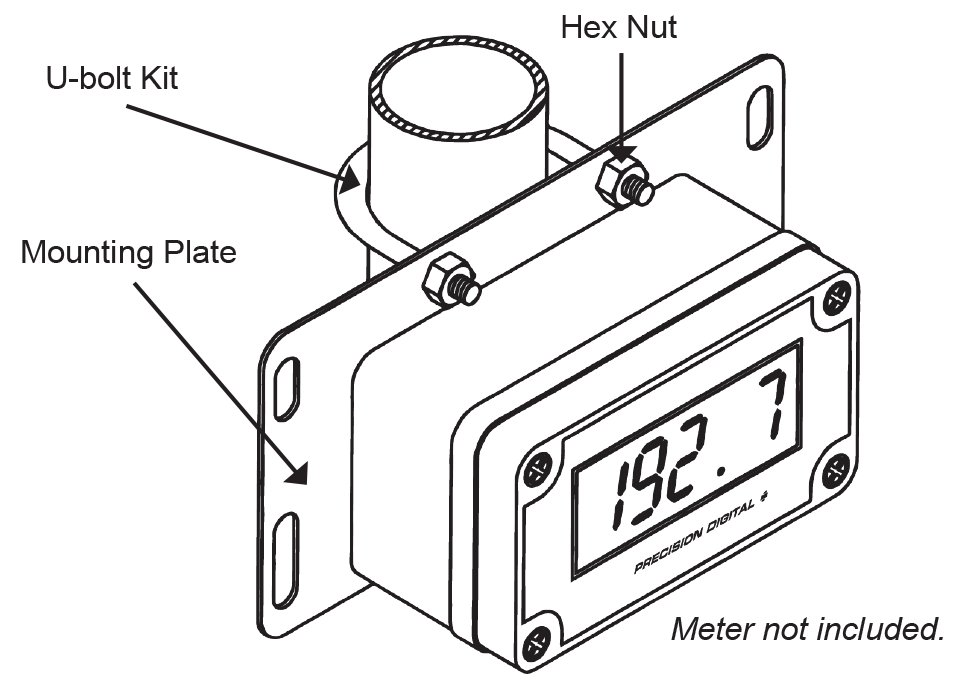
PDA6845        Zinc Plated Pipe Mounting Kit with 2 Holes        $49.00
PDA6845-SS        Stainless Steel Pipe Mounting Kit with 2 Holes        $79.00
PDA-SSTAG        Stainless Steel Tag        $25.00


Documentation
The documentation can be downloaded from these links:
PD685: Instruction Manual
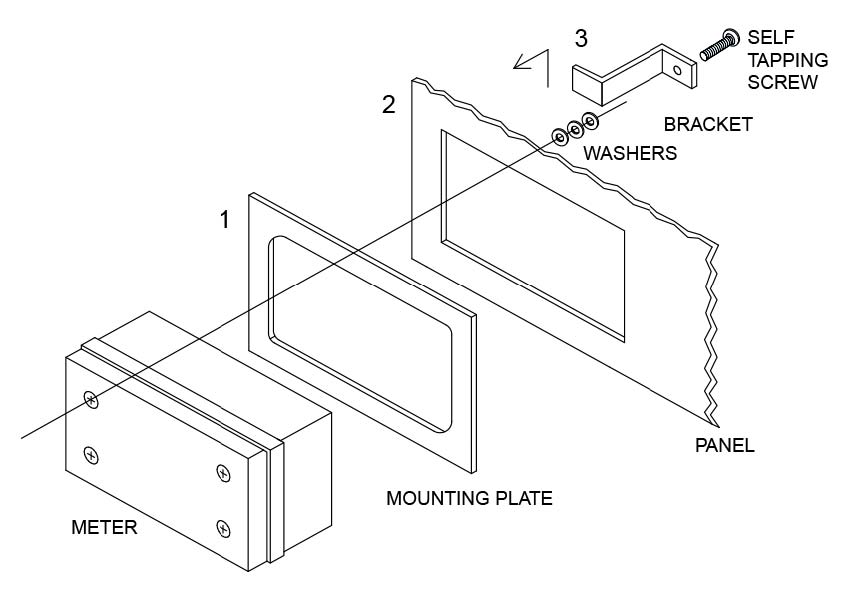
Mounting Kits for Precision Digital Meters
Setup and Calibration Services Order Form
Stainless Steel Tag Order Form

See How You can Use Precision Digital Products for
View Flow Level, Pressure and Temperature Applications
 What's New | News | Products | Pricelist | Services | Support | Jobs | Contact Us | Site Map
Precision Digital: Distributors and Manufacturers of Digital Panel Meters and Indicators
View Flow Applications for PDC Products View Level Applications for PDC Products View Pressure Applications for PDC Products View Temperature Applications for PDC Products PDC Footer