Precision Digital ISO 9001:2000 Certified Quality System Go to Precision Digital Homepage Shop Online
What's New at Precision Digital News from Precision Digital Rate/Totalizers, Fluidwell, NOVA Rate/Totalizers, Fluidwell, NOVA Precision Digital Pricelists Precision Digital Services Precision Digital Support Services Instrumentation Design & Sales JobsContact Precision Digital CorporationView Precision Digital Videos
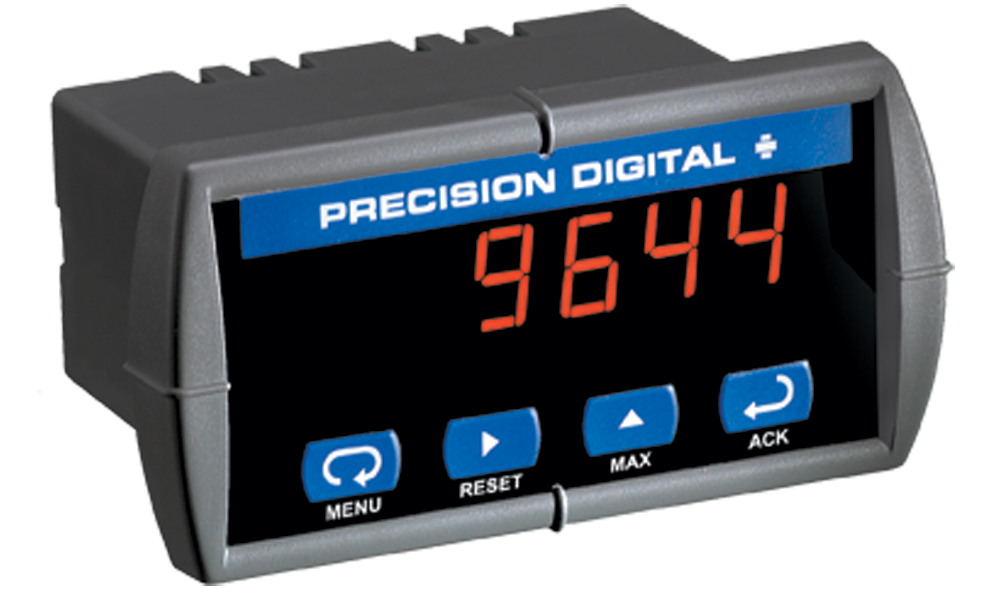
PD644 HIGH-VOLTAGE DC DIGITAL PANEL METER


Setup Operation Wiring Diagrams MeterView Software

Dimensions Specifications Ordering Information Documentation

HIGH-VOLTAGE DC DIGITAL PANEL METER

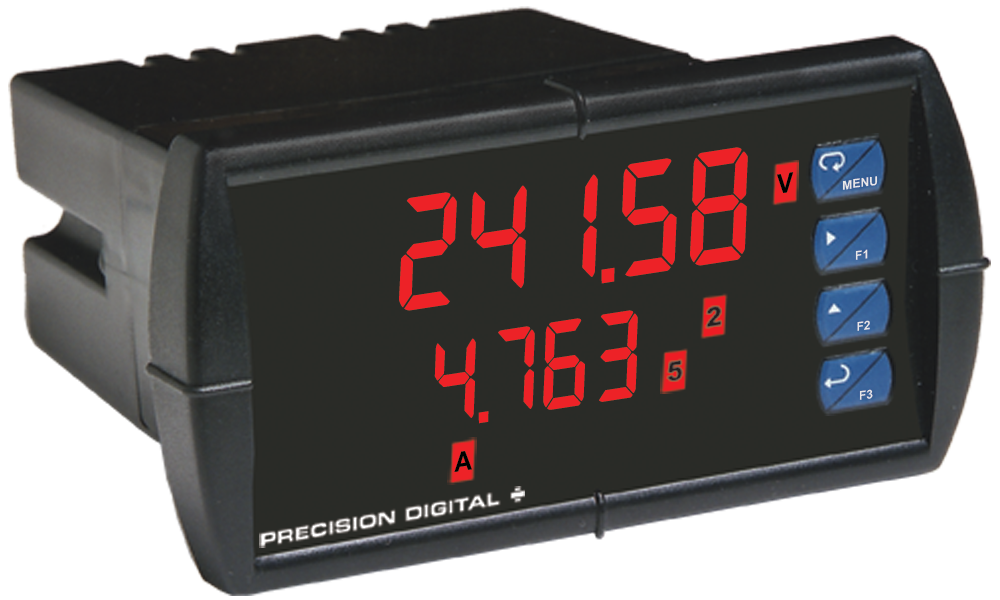
DC Voltage Digital Panel Meter, PD644 Javelin
DC Voltage Digital Panel Meter, PD644 Javelin: UL Mark for Canada and the United States


Features

  • 0-300 VDC input
  • NEMA 4X, IP65 front
  • Scale in engineering units
  • Sunlight readable LED display
  • 4-20 mA analog output
  • Two form C 3 A relays option
  • RS-485 serial communications
  • Modbus® RTU option
  • Data acquisition with MeterView®
 

EASY SETUP AND PROGRAMMING

The Javelin D is easy to set up and program because everything is done using the simple four-button programming method. There are no jumpers, and no need to ever open the case. After completing setup of one meter, additional meters can be “cloned” using the time-saving Copy function.


Front Panel Buttons

DC Voltage Digital Panel Meter, Front panel display


User Friendly Menu Structure

To simplify programming, the Javelin’s setup functions are divided into two menus. A main menu handles all the basic setup functions.
An advanced features menu handles the special functions not commonly used.
  • Press the Menu button to enter or exit the Programming Mode at any time.
  • Press the Right arrow button to move to the next digit during digit programming.
  • Press the Up arrow button to scroll through the menus, decimal point, or to increment the value of a digit.
  • Press the Enter/Ack button to access a menu, accept a setting, or to acknowledge relays.
DC Voltage Digital Panel Meter, setup menu DC Voltage Digital Panel Meter, Programming Menu DC Voltage Digital Panel Meter, Password Menu
Setup Menu

   Select input
   Decimal point
   Degrees F or C
Program Menu

   Scale meter without signal
   Calibrate meter with signal
Password Menu

   Prevent changes to meter     settings

Setting Numeric Values

The numeric values are set using the Right and Up arrow buttons. Press the Right arrow button to select next digit and the Up arrow button to increment the digit value.

The digit being changed is displayed brighter than the rest.

Press the Enter/ACK button, at any time, to accept a setting or the Menu button to exit without saving changes.

DC Voltage Digital Panel Meter,set digit value


Main Menu

The main menu consists of the three most commonly used functions: Setup, Program, and Password. Press the Menu button to enter the Programming Mode then press the Up arrow button to scroll main menu.

The Setup menu is used to select the input signal, °F or °C, and relay setup. The Program menu is used to calibrate the meter.

The display moves to the next menu after the Enter/ACK button is pressed.

DC Voltage Digital Panel Meter, Main Menu


Advanced Features Menu

To simplify the setup process, the least used features in most applications are located in the Advanced Features menu.

To access the Advanced Features menu, press and hold the Right arrow button first and then press and hold the Menu button for three seconds.


DC Voltage Digital Panel Meter, Advanced Menu Features

Noise Filter (Digital Panel meters, Advanced Menu Function,  Filter)

This function averages any minor or quick changes in the input signal and displays the reading with greater stability.

Noise Filter Bypass (Digital Panel meters, Advanced Menu Function,  Noiise bypass)

The meter can be programmed to filter small input changes (with noise filter function), but allow larger input changes to be displayed immediately by setting the noise filter bypass function accordingly. If the change in input signal exceeds the bypass value, no filtering will occur and the new value will be displayed immediately.

Serial Communication (Digital Panel meters, Advanced Menu Function,  Serial)

This menu is used to program the Serial communication parameters such as the address for each meter when used in a multi-drop mode.

The meter is equipped with serial communications capability as a standard feature using PDC Serial Communication Protocol. The Modbus RTU Protocol is optional and can be purchased at any time.

Click here for more information on serial communications.

Protocol Selection Menu (Digital Panel meters, Advanced Menu Function,  Protocal Selection)

The Protocol selection menu is used to select either the PDC or the Modbus protocol. If Modbus option is purchased separately, it is necessary to enter a four-digit code to permenantly enable the Modbus protocol.

Meter Copy (Digital Panel meters, Advanced Menu Function,  Meter Copy)

The Copy function is used to copy (or clone) all the settings from one Javelin D meter to other Javelin D meters in less than 5 seconds!

The Copy function is a standard feature on all meters. and does not require a serial communication adapter.

DC Voltage Digital Panel Meter, Copy Feature


Select Menu (Digital Panel meters, Advanced Menu Function,  Select Menu)

The Select menu is used to select linear or square root function, display intensity, and low-flow cutoff. Selection for relay or analog output is a factory setting depending on the option installed.

Display Intensity Menu (Digital Panel meters, Advanced Menu Function,  Diplay Intesnsity)

The Display Intensity function allows the selection of eight user selectable levels of intensity to help compensate for various lighting conditions, including direct sunlight.

Diagnostic Menu (Digital Panel meters, Advanced Menu Function,  Diagnostic Menu)

The Diagnostic function aids in troubleshooting by providing a convenient way to review setup and programming parameters.


VERSATILE OPERATION

The Javelin Max/Min function, two relays, and serial communication options provide all the utility you need to handle all the common applications.

Powerful Relay Functionality

All relay functions are set up from the front panel.
  • Automatic reset only
  • Automatic or manual reset
  • Latching or non-latching relays
  • Alternation control
  • On and off time delays from 0 to 199 seconds
  • Fail-safe operation is user selectable

Maximum/Minimum Readings

To display the maximum and minimum readings since the last reset/power-up, use the MAX button.


WIRING DIAGRAMS

Voltage Inputs

The Javelin D is factory calibrated to accept DC voltages up to 300 VDC.

DC Voltage Digital Panel Meter, 0-300 VDC Wiring Diagram

0-300 VDC


Isolated 4-20 mA Analog Output

DC Voltage Digital Panel Meter, 4-20 mA Wiring Diagram

4-20 mA Output Powered by Meter

DC Voltage Digital Panel Meter, 4-20 mA External Powered Diagram

4-20 mA Output Powered Externally


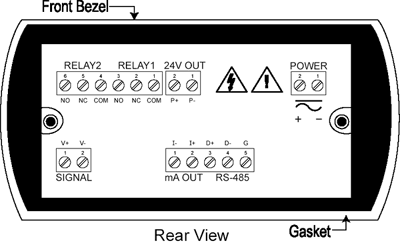
Connector Locations

DC Voltage Digital Panel Meter, meter w/ Relay options

Meter with Relays Options

FIELD ENCLOSURES

The Javelin D is available with a wide variety of NEMA 4, NEMA 4X, & explosion-proof enclosures. NEMA 4 & NEMA 4X Enclosures

NEMA 4 & NEMA 4X Enclosures

The NEMA 4 and NEMA 4X enclosures are available in plastic, stainless steel, and steel. They come with pre-punched 1/8 DIN cutouts for up to ten meters. The meters are mounted in the enclosure door so they can be programmed without opening the enclosure. Options include 2" pipe mounting kits and engraved plastic labels.

See the Trident Enclosures data sheet for complete details and specifications regarding the NEMA 4 and NEMA 4X Enclosures.


Low-Cost Plastic NEMA 4X Enclosure


DC Voltage Digital Panel Meter with PDA2801 Low-cost NEMA 4X Enclosure  Shown with One PD644
PDA2801 Low-cost NEMA 4X Enclosure
Shown with One PD644


The PDA2801 is a low-cost, compact,
plastic NEMA 4X enclosure that will
house one Javelin D meter.
  Plastic, Steel & Stainless Steel
Optional NEMA 4 & 4X enclosures house from one to ten meters and feature a hinged door.

Enclosures and meters are ordered and packaged seperately.


DC Voltage Digital Panel Meter inside PDA2706 NEMA 4 Enclosure  Shown with Six PD644 Meters

PDA2706 NEMA 4 Enclosure
Shown with Six PD644 Meters


Explosion-Proof Enclosures


These explosion-proof enclosures house one or two Tridents and are UL & C-UL Classified as NEMA 4, 7 & 9 for location in Class I, Groups C & D; Class II, Groups E, F, G; and Class III. Enclosures and meters are ordered and packaged separately.

DC Voltage Digital Panel Meter, PDA2446 Explosion-Proof Enclosure shown with 2 PD644 meters
PDA2446 Explosion-Proof Enclosure
shown with 2 PD644 meters

Engraved Plastic Labels


DC Voltage Digital Panel Meter, Engraved Plastic Labels
Optional custom engraved plastic labels are the perfect solution for identifying both the enclosure and each individual meter. Whether the meters are mounted in one of our enclosures or installed into your existing control panel these custom engraved plastic labels are the answer you’re looking for!


QUICK INSTALLATION

The Javelin is housed in a shallow-depth case that is designed for easy installation and servicing. The extra large front bezel is rated Type 4X & IP65. The mounting brackets are locked in place to make it easy to mount the meter in the panel. Removable screw terminal connectors make for easy and convenient wiring.


METERVIEW® SOFTWARE

Precision Digital’s MeterView® software allows the Javelin D to act as a data logger.
DC Voltage Digital Panel Meter, MeterView
View MeterView Video
Dialup | Broadband

Data Acquisition

MeterView® software provides a convenient way to collect the data generated by the Javelin D meters. The user can select the logging time interval and the engineering units that will be displayed on the computer screen. Data is written to a file that could then be imported into a spreadsheet or other application.

Data Logging up to 100 Javelin D Meters

DC Voltage Digital Panel Meter, MeterView Sample
  •  Save data to a file
  •  Monitor up to 10 meters per tab
  •  10 tabs = 100 meter total capacity
  •  Acknowledge

Sample File Generated by MeterView®

DC Voltage Digital Panel Meter, MeterView Logfile
Great for tank level monitoring!


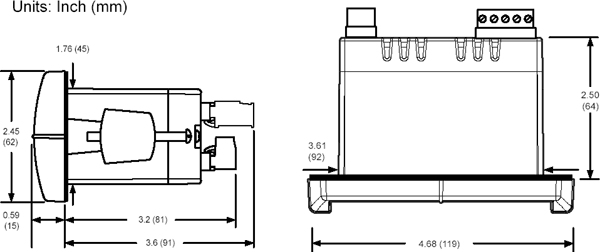
MOUNTING DIMENSIONS

DC Voltage Digital Panel Meter, Mounting Dimension


Notes:
  1. Panel cutout required: 1.772" x 3.622" (45 x 92 mm)
  2. Panel thickness: 0.040" – 0.250"(1.0 – 6.4 mm)
  3. Mounting brackets lock in place for easy mounting
 

SPECIFICATIONS

Except where noted all specifications apply to operation at +25°C.

General

Input: 0-300 VDC
Display: 0.56" (14.2 mm) red LED, 4 digits (-1999 to 9999)
Accuracy: ±0.05% FS ±1 count
Display Intensity: Eight user selectable intensity levels
Decimal Point: Up to 3 decimals: d.ddd, dd.dd, ddd.d, or dddd
Front Panel: NEMA 4X, IP65; panel gasket provided
Programming Methods: Four front panel buttons, cloning with Copy feature, and Modbus registers
Noise Filter: Programmable 2 to 199 (0 will disable filter)
Display Update Rate: 5/second
Overrange: Display flashes 9999
Underrange: Display flashes -1999
Recalibration: Input is calibrated at the factory; recalibration is recommended at least every 12 months.
Temperature Drift: ±50 PPM/°C maximum
Input Impedance: Greater than 1 M.
Max/Min Display: Stored until reset by user or meter is turned off.
Password: Restricts modification of programmed settings
Non-Volatile Memory: Settings stored for a minimum of ten years.
Power Options: 85-265 VAC, 50/60 Hz; 90-265 VDC, 20 W max or 12-36 VDC; 12-24 VAC, 6 W max.
Required Fuse: UL Recognized, 5 A max, slow blow; up to 6 meters may share one fuse.
Normal Mode Rejection: 64 dB at 50/60 Hz
Isolation: 4 kV input/output-to-power line; 500 V input-to-output or output-to-24 VDC supply
Operating Temperature: 0 to 65°C
Storage Temperature: -40 to 85°C
Relative Humidity: 0 to 90% non-condensing
Connections: Removable screw terminals accept 12 to 26 AWG
Enclosure: 1/8 DIN, high impact plastic, 94V-0, color: gray
Weight: 8 oz (227 g) (including options)
UL File Number: E160849; 508 Industrial Control Equipment
Warranty: 3 years parts & labor
Extended Warranty: 1 or 2 years, refer to Price List for details

Serial Communications

Compatibility: EIA-485
Meter Address: PDC protocol: 0 to 99, Modbus protocol: 1 to 247
Baud Rate: 300 to 19,200 bps
Transmit Time Delay: Programmable 0 to 199 ms
Data: 8 bit (1 start bit, 1 stop bit)
Parity: None, even, or odd (Modbus only; PDC protocol does not use parity)
Byte-to-Byte Timeout: 0.01 to 2.54 seconds (Modbus only)
Turn Around Delay: Less than 2 ms (fixed)

Refer to PDC and Modbus Serial Communications Protocol manuals for details.

Relays


Rating: 2 Form C (SPDT); rated 3 A @ 30 VDC or 3 A @ 250 VAC resistive load; 1/14 HP @ 125/250 VAC inductive loads
Deadband: 0-100% FS, user selectable
High or Low Alarm: User may program any alarm for high or low
Relay Operation:
   1. Automatic (non-latching)
   2. Latching
   3. Pump alternation control
Relay Reset: User selectable via front panel buttons or PC
   1. Automatic reset only (non-latching)
   2. Automatic + manual reset at any time (non-latching)
   3. Manual reset only, at any time (latching)
   4. Manual reset only after alarm condition has cleared (latching)
Automatic Reset: Relays reset when input passes the reset point
Manual Reset: Front panel button, MeterView, Modbus registers
Time Delay: 0 to 199 seconds, on and off delays; programmable
Fail-Safe Operation: Programmable, independent for each relay. Relay coils are energized in non-alarm condition. In case of power failure, relays will go to alarm state.

Isolated 4-20 mA Transmitter Output


Output Range: 1.00 to 23.00 mA typical
Calibration: Factory calibrated 4.00 to 20.00 mA
Accuracy: ±0.1% FS ±0.004 mA
Temperature Drift: 50 PPM/°C
Note: Analog output drift is separate from input drift
Transmitter Supply: Isolated 24 VDC ±10% @ 200 mA max
Isolation: 500 V input-to-output or output-to-24 VDC supply; 4 kV input/output-to-power line
External Power: 35 VDC maximum
Output Loop Resistance:
  Loop Resistance
Power supplyMinimumMaximum
24 VDC10Ω700Ω
35 VDC100Ω1200 Ω (external)

MeterView Specifications

MeterView® may be used for data logging applications.

System Requirements: Windows® 95/98/ME/NT4/2000/XP
Communications: RS-232 adapter or RS-422/485 adapters with an RS-232 to RS-485 or USB to RS-485 converter may be used for communicating with the meters.
Number of Meters: Up to 100 meters simultaneously with addressing capability; minimum scan time for 100 meters: 60 sec
Meter Address: 00 to 99
Baud Rate: 300 bps to 19,200 bps; selection must match the baud rate selected in the meters.
Screen Update Rate: Dependent on system and meter settings. Rates of up to 10 meters/second are attainable at 19,200 bps.
Logging Interval: 2 seconds to 60 hours or manual
Manual Logging: Data saved to file when Log button is pressed.
Data Logging Report: Log data to HTML file format. All enabled meters are logged to a single file.
Alarm Notification: Pop-up message indicates new alarm condition. Alarm alert notification may be disabled.
Event Log: Important events are logged with date and time stamp.
Relay/Alarm Status: Indicate relay/alarm status with customized color and message label. Relay status indication may be disabled.
Units & Tag Number: Show engineering units and tag number information; these settings are not saved to the meter.
Relay Acknowledge: Relays may be acknowledged by clicking on corresponding Relay Status button. Meters must be set up for manual reset and Relay Mode must be enabled in MeterView.


Disclaimer
The Information contained in this document is subject to change without notice. Precision Digital Corporation makes no representations or warranties with respect to the contents hereof, and specifically disclaims any implied warranties of merchantability or fitness for a particular purpose.

ORDERING INFORMATION


Products

Model Description Price
PD644-6R3-14        Javelin D High-Voltage DC Meter; No Options; Powered from 85-265 VAC        $259.00
PD644-6R5-14        Javelin D High-Voltage DC Meter; 2 Relays; Powered from 85-265 VAC        $309.00
PD644-7R3-04        Javelin D High-Voltage DC Meter; No Options; Powered from 12-36 VDC        $309.00
PD644-7R5-04        Javelin D High-Voltage DC Meter; 2 Relays; Powered from 12-36 VDC        $359.00
 

Enclosures

PDA2300 Enclosure Family Enclosure Selection Utility
Model Description Price
PDA2407        Plastic NEMA 4X Enclosure for 1 Meter (Any Type)        $199.00
PDA2411        Plastic NEMA 4X Enclosure for 2 Meter (Any Type)        $274.00
PDA2414        Plastic NEMA 4X Enclosure for 1 Type D + 1 Type A, B, C or E Meter        $274.00
PDA2501        Plastic NEMA 4X Enclosure for 1 Type C Meter        $159.00
PDA2502        Plastic NEMA 4X Enclosure for 2 Type C Meters        $199.00
PDA2503        Plastic NEMA 4X Enclosure for 3 Type C Meters        $229.00
PDA2504        Plastic NEMA 4X Enclosure for 4 Type A, B, C, or E Meters        $334.00
PDA2505        Plastic NEMA 4X Enclosure for 5 Type A, B, C, or E Meters        $354.00
PDA2506        Plastic NEMA 4X Enclosure for 6 Type A, B, C, or E Meters        $374.00
PDA2507        Plastic NEMA 4X Enclosure for 7 Type A, B, C, or E Meters        $474.00
PDA2508        Plastic NEMA 4X Enclosure for 8 Type A, B, C, or E Meters        $514.00
PDA2509        Plastic NEMA 4X Enclosure for 9 Type A, B, C, or E Meters        $554.00
PDA2510        Plastic NEMA 4X Enclosure for 10 Type A, B, C, or E Meters        $584.00
PDA2512        Plastic NEMA 4X Enclosure for 2 Type A, B, C, or E Meters        $359.00
PDA2522        Plastic NEMA 4X Enclosure for 1 Type D + 1 Type C Meter        $344.00
PDA2601        Stainless Steel NEMA 4X Enclosure for 1 Type C Meter        $449.00
PDA2602        Stainless Steel NEMA 4X Enclosure for 2 Type C Meters        $504.00
PDA2603        Stainless Steel NEMA 4X Enclosure for 3 Type C Meters        $579.00
PDA2604        Stainless Steel NEMA 4X Enclosure for 4 Type A,B, C or E Meters        $734.00
PDA2605        Stainless Steel NEMA 4X Enclosure for 5 Type A,B, C or E Meters        $784.00
PDA2606        Stainless Steel NEMA 4X Enclosure for 6 Type A,B, C or E Meters        $839.00
PDA2622        Stainless Steel NEMA 4X Enclosure for 1 Type D + 1 Type C Meter        $499.00
PDA2701        Steel NEMA 4 Enclosure for 1 Type C Meter        $219.00
PDA2702        Steel NEMA 4 Enclosure for 2 Type C Meters        $314.00
PDA2703        Steel NEMA 4 Enclosure for 3 Type C Meters        $369.00
PDA2704        Steel NEMA 4 Enclosure for 4 Type A, B, C, or E Meters        $419.00
PDA2705        Steel NEMA 4 Enclosure for 4 Type A, B, C or E Meters        $474.00
PDA2706        Steel NEMA 4 Enclosure for 5 Type A, B, C or E Meters        $524.00
PDA2722        Steel NEMA 4X Enclosure for 1 Type D + 1 Type C Meter        $329.00
PDA2801        Low-Cost Plastic NEMA 4X Enclosure for 1 Type C Meter        $94.00
PDA2811        Low-Cost Plastic NEMA 4X Enclosure for 1 Meter (Type A, B, C or E)        $114.00
PDA2812        Low-Cost Plastic NEMA 4X Enclosure for 2 Meters (Any type)        $159.00
PDA2821        Low-Cost Plastic NEMA 4X Enclosure for 1 Type D Meter + 1 Type A, B, C or E Meter        $179.00
  
Accessories
Model Description Price
 PDA7232        Trident RS-232 Serial Adapter        $79.00
 PDA7420        Trident Meter Copy Cable        $9.00
 PDA7422        Trident RS-422/485 Serial Adapter        $79.00
 PDA7485-I        RS-232 to RS-422/485 Isolated Converter        $169.00
 PDA7485-N        RS-232 to RS-422/485 Non-Isolated Converter        $139.00
 PDA8485-I        USB to RS-422/485 Isolated Converter        $189.00
 PDA8485-N        USB to RS-422/485 Non-Isolated Converter        $159.00
 PDX6901        Suppressor (snubber): 0.01µF/470Ω,        $10.00
 PDN-MODBUS        Modbus Option Enable        $50.00


DOCUMENTATION

PD644: Instruction Manual
PD644: Data Sheet
CAD file of meter front for panel layout
Digital Panel Meters - QuickSelect Guide
PDC Modbus Register Tables
Serial Communications Adapters & Converters
PDC Serial Communication Protocol
Setup and Calibration Services Order Form

See How You can Use Precision Digital Products for
View Flow Level, Pressure and Temperature Applications
 What's New | News | Products | Pricelist | Services | Support | Jobs | Contact Us | Site Map
Precision Digital: Distributors and Manufacturers of Digital Panel Meters and Indicators
View Flow Applications for PDC Products View Level Applications for PDC Products View Pressure Applications for PDC Products View Temperature Applications for PDC Products PDC Footer